2027 Monthly Planner – Editable Planner
If you've ever tried to stay organized with a rigid, pre-printed planner, you know the frustration: pages you never use, sections that don't fit your life, and no room for your own ideas. The 2027 Monthly Planner – Editable Planner is a different kind of tool. It's a Canva-based template pack with over 40 pages that you can customize, rearrange, and print as many times as you like. Whether you need a simple monthly view or a comprehensive system for tracking habits, budgets, meals, and travel, this set gives you the building blocks to create exactly what you need.
The real appeal here is flexibility. Instead of buying a bound planner and making do, you start with a blank canvas—well, a set of well-designed templates—and you build a planner that matches your workflow. You can change colors, fonts, page order, add or remove sections, and even duplicate pages that you use most often. Everything works inside a free Canva account, so there's no expensive software to buy.
Let's walk through what this template pack includes, how different people might use it, and what you should keep in mind before you start.
What comes with the 2027 Monthly Planner
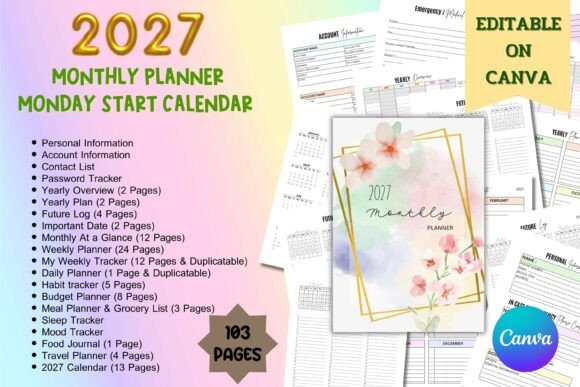
The full set includes more than 40 A4-sized templates. Here's a quick look at the main categories you'll find inside:
- Account Information, Contact List, Password Tracker – three essential pages for keeping your logins and important contacts in one place.
- Yearly Overview (2 pages) and Yearly Plan (2 pages) – perfect for mapping out big projects, holidays, or goals across the entire year.
- Future Log (4 pages) and Important Date (2 pages) – great for noting birthdays, deadlines, and events that matter later.
- Monthly at a Glance (12 pages) – one page per month for a quick calendar view.
- Weekly Planner (24 pages) and My Weekly Tracker (12 pages, duplicatable) – enough to cover most of the year with room to repeat.
- Daily Planner (1 page, duplicatable) – a simple layout you can copy for each day you need.
- Habit Tracker (5 pages), Budget Planner (8 pages), Meal Planner & Grocery List (3 pages) – dedicated pages for routines and finances.
- Sleep Tracker, Mood Tracker, Food Journal (1 page each) – for wellness and self-reflection.
- Travel Planner (4 pages) and 2027 Monday Start Calendar (13 pages) – for trips and full month views.
That's a lot of variety. The idea is that you pick what works for you and leave out what doesn't.
How different people can use this planner
The 2027 Monthly Planner – Editable Planner is designed for adults aged 20 to 50, which covers a wide range of lifestyles. Here are some realistic examples:
Freelancers and small business owners
If you're running your own business, you need to track project deadlines, client contact information, budgets, and sometimes even meals or sleep when you're in a busy season. You might use the Yearly Overview to map out major deliverables, the Weekly Planner to schedule client calls, and the Budget Planner to keep an eye on expenses. The Password Tracker is a small thing, but it saves time when you have multiple accounts for different tools and platforms.
Marketers and bloggers
Content planning often involves looking months ahead. The Future Log is useful for brainstorming campaign ideas or editorial themes, while the Monthly at a Glance helps you schedule posts around holidays or product launches. The Habit Tracker could be used to track daily tasks like writing, editing, or social media engagement.
Entrepreneurs and educators
Teachers and trainers often juggle lesson plans, meetings, and personal goals. The weekly and daily pages give you a structured place to organize class schedules, grading deadlines, and professional development. The Travel Planner is handy for field trips or conferences.
Hobbyists and casual users
Even if you don't run a business, you might want to track fitness habits, plan meals, or log your mood. The Food Journal and Mood Tracker are simple pages you can use daily without much effort. The Sleep Tracker is helpful if you're trying to improve your rest routine.
Why editable planners matter
One of the biggest advantages of an editable planner is that you're not stuck with someone else's layout. With this template pack, you can:
- Change the color scheme to match your personal style or brand.
- Adjust fonts for readability or aesthetic preference.
- Reorder pages so the sections you use most are at the front.
- Duplicate pages like the Daily Planner or Weekly Tracker if you need more than what's included.
- Delete pages you know you'll never use, so your planner stays focused.
This kind of flexibility is especially valuable if you're creating a planner for a specific purpose—say, a health-focused planner for the first half of the year, or a business planner for Q1. You can also use the same templates to create planners for different people, which is why this is also a popular option for KDP (Kindle Direct Publishing) interiors. You can design a unique planner, upload it, and sell it as your own product.
Practical considerations before you start
Before diving in, there are a few things to keep in mind:
- Basic Canva knowledge is helpful. You don't need to be a designer, but you should know how to navigate Canva, use the text tool, and understand layers. If you're completely new, Canva's free tutorials are a good starting point.
- The templates are A4 size. Make sure your printer or preferred print service supports A4. If you're used to US Letter, you may need to adjust margins or print settings.
- Think about how you'll bind it. Once you print your customized pages, you'll need a binder, spiral binding, or a simple stapler to hold everything together. Some people like to punch holes and put them in a ring binder so they can swap pages throughout the year.
- Duplicatable pages mean you can scale up. If you want a full year of daily pages, you can duplicate the Daily Planner template 365 times. But that's a lot of printing, so consider whether you really need a daily page for every single day, or just the busy ones.
Where to use the planner in real life
The 2027 Monthly Planner – Editable Planner works well in both digital and print forms. Some people prefer to edit and use the planner entirely on a tablet or iPad, using apps like GoodNotes or Notability. Others print the pages and keep them on a desk or in a bag. The templates are clean enough to be used in professional settings, but also friendly enough for personal use at home.
If you're using the planner digitally, you can add links, draw with a stylus, and type directly on the pages. If you print them, the layouts are designed with enough space to write by hand. You can also mix both: edit the colors and structure in Canva, export the PDF, and print only the pages you need.
Final thoughts on the 2027 Monthly Planner
What makes this planner set stand out is its versatility. It's not a one-size-fits-all product, but rather a kit of parts that you assemble your own way. Whether you're a freelancer tracking invoices, a blogger planning content, an educator organizing lessons, or someone trying to build better habits, the templates give you a solid starting point without dictating how you must use them.
The ability to customize everything in Canva means you can make a planner that feels personal and actually fits your routine. And if you decide to sell planners on KDP, the same templates can be adapted into multiple products with different themes and styles.
If you're looking for a planner that adapts to you—not the other way around—the 2027 Monthly Planner – Editable Planner is worth exploring. Start with a few pages, see what works, and build from there. That's the whole point of an editable system.