Creating a Unique KDP Interior with Bold and Easy Dessert Coloring Pages
The self-publishing world has opened up remarkable opportunities for creators, hobbyists, and entrepreneurs alike. Among the most popular niches on platforms like Amazon KDP are coloring books, and one of the most inviting themes is desserts. When you use Bold and Easy Dessert Coloring Pages, you are not just putting together a collection of images—you are crafting a relaxation tool, a gift for stress relief, and a product that appeals to a wide audience. The package described here—a comprehensive set of high-resolution files in multiple formats—is designed to help you build your own unique interior quickly and professionally. Let’s explore what makes this collection stand out, how to leverage it, and why bold and easy designs are a smart choice for any coloring book creator.
Understanding the Package: What You Get
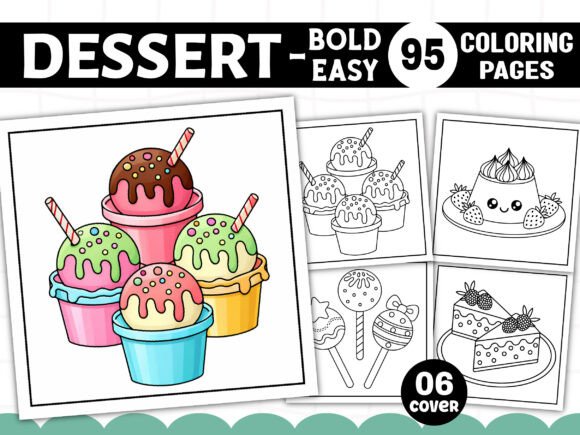
When you download this interior set, you receive a zip file containing everything needed to assemble a complete coloring book. The dimensions are a square 8.5” x 8.5”, a popular size for children’s and adult coloring books alike. All files are at 300 DPI (dots per inch), ensuring crisp, clear lines that print beautifully on standard paper. The colors are black and white—traditional coloring book style—with solid outlines designed to be easy to fill in. The package includes 95 PNG, 95 JPG, 95 SVG, plus one PDF and one EPS file all ready for print. Additionally, you get six free PNG book cover files, a huge time-saver for interior designers. This diversity of formats means you can edit, resize, or convert the pages using virtually any software—whether you prefer Adobe Illustrator, Photoshop, Procreate, or free tools like GIMP or Inkscape.
File Formats Explained
- PDF (print ready): A single, paginated file ready to upload to KDP or other print-on-demand services. No extra assembly needed.
- EPS (print ready): Vector-based format for professional designers who want to scale, tweak colors, or combine elements without losing quality.
- PNG and JPG: Raster images at 300 DPI—ideal for quick previews, digital use, or for creators who prefer to work in layers.
- SVG: Scalable vector graphics, perfect for cutting machines like Cricut or Silhouette, plus for resizing without pixelation.
Having all these options means you can customize your interior to match your branding, add your own borders, insert page numbers, or combine pages from different collections—all while retaining the original bold, easy-to-color line art.
Why Bold and Easy Dessert Designs Matter
The phrase “bold and easy” is not just a catchy title. It refers to the thickness and clarity of the outlines. In a dessert coloring book, you want images that are instantly recognizable—a slice of cake, an ice cream cone, a cupcake, a donut, a lollipop—and that allow colorists to fill them without frustration. Thick lines prevent the crayon or marker from bleeding into adjacent sections, and large open areas make it possible for younger children, seniors with limited dexterity, or adults seeking stress relief to enjoy the activity. The Bold and Easy Dessert Coloring Pages in this collection are designed with these exact considerations: each dessert shape is clearly defined, details are kept minimal but charming, and the overall composition fits well on an 8.5” x 8.5” page. This is a deliberate choice that expands your potential customer base to include:
- Parents looking for simple, mess-free activities for toddlers and preschoolers.
- Teachers and educators who need fast, reproducible pages for classroom art projects or fine motor skill development.
- Therapy professionals using coloring as a mindfulness tool for clients who may feel overwhelmed by intricate mandalas.
- Hobbyist self-publishers who want a ready-made interior that requires minimal editing before upload.
- Art journalers and bullet journal enthusiasts who love to add whimsical dessert stickers or cutouts after coloring.
Practical Steps to Build Your Interior with This Collection
Even though the package comes with a print-ready PDF, you may want to personalize the book—add a title page, include a copyright notice, or rearrange the order of pages. Here’s a typical workflow using the provided files after receiving the zip.
Step 1: Choose Your Format and Software
If you are comfortable with Adobe InDesign or Canva, you can import the PNG or JPG images into a blank 8.5” x 8.5” document. For those using vector software, the SVG or EPS files give you the ability to resize each dessert illustration without any loss of quality—useful if you want to create a larger border or a smaller page size later. The PNG files (with transparent backgrounds) are particularly convenient for layering over patterned backgrounds if you decide to add a subtle pastel background before uploading, though the original files are black and white only.
Step 2: Assemble Pages
The 95 dessert pages provide plenty of variety. You can arrange them by category—cakes first, then frozen treats, then cookies—or mix them randomly for surprise. Because the designs are bold and easy, each page is likely to take only a few minutes to color, making the book ideal for short creative breaks. You might also consider adding a “This book belongs to” page at the beginning and a sample colored page (colored by you or a friend) as a reference.
Step 3: Add Finishing Touches
Use the included free book cover files (PNG format) to create a professional-looking wrap. The cover designs likely feature a dessert-themed border or illustration that matches the interior style. You can overlay your title, author name, and a short subtitle like “95 Sweet Treats to Color.” Because the cover files are separate, you can edit them in any image software. Remember to keep the final PDF at 300 DPI and with bleeds if required by your print provider (usually 0.125” on each side).
Real-World Applications and User Benefits
Beyond the standard KDP interior, this collection can serve multiple purposes. Educators might print individual pages for a “Dessert Day” activity, where children learn about different sweets while practicing hand-eye coordination. Therapists can use the simple outlines to engage patients in conversations about favorite foods or emotions associated with treats. Parents can keep a stack of printed pages in a binder for restaurant outings or quiet time. For the self-publisher, the main advantage is the elimination of time-consuming drawing or licensing fees. With 95 unique designs, you can launch a niche coloring book without needing to hire an illustrator or master drawing yourself.
Comparison with Other Coloring Book Interiors
Many coloring books on Amazon feature highly detailed, complex illustrations that can overwhelm new colorists. By contrast, Bold and Easy Dessert Coloring Pages fill a gap in the market: they are simple enough for beginners but charming enough for adults who want a quick, satisfying coloring session. The square 8.5” format also stands out—most coloring books are 8.5” x 11” or 6” x 9”. The square size feels modern and works well on social media, as it fits nicely into Instagram or Pinterest posts. This can be a subtle marketing advantage when you share previews of your book.
Considerations for Print Quality
Because the files are black and white with high-contrast lines, they reproduce well even on standard 20 lb paper. However, if you plan to print on both sides, test a few pages first with your intended coloring tools (markers, crayons, colored pencils) to ensure no bleed-through. The solid bold lines mean that even if some bleeding occurs, the outline remains clear. For best results, use heavier paper (24 lb or above) or add a “color with care” note in the front matter.
Enhancing Your Listing with E-E-A-T Signals
To succeed on KDP, you need to demonstrate experience, expertise, authoritativeness, and trustworthiness. Even though you are using pre-made designs, you can add value by including a short guide on coloring tips—how to blend colors on simple shapes, suggested color palettes for desserts (e.g., pink for strawberry, brown for chocolate), or a fun fact about each dessert. Such content shows that you care about the user experience and have thought beyond the pages. Additionally, because the collection provides multiple file types, you can highlight in your book description that the illustrations are “vector scalable” or “printable from any device,” appealing to both digital and print customers.
Natural Use of Keywords
Throughout your listing and promotional materials, naturally incorporate variations like “dessert coloring book interior,” “bold easy coloring pages for adults,” “KDP ready dessert pages,” or “sweet treat coloring sheets.” The phrase Bold and Easy Dessert Coloring Pages should appear in the title and description because it directly matches the product set. However, avoid keyword stuffing—instead, weave it into useful sentences: “The Bold and Easy Dessert Coloring Pages included in this interior are optimized for stress-free coloring, making them perfect for both children and adults.” In the article itself, you can mention that the collection is “designed for those who appreciate Bold and Easy Dessert Coloring Pages that require minimal fine motor control while still offering delightful subject matter.”
Leveraging the 95 Designs for Themed Variations
With 95 pages, you have enough material to split into multiple smaller books if you wish. For example, you could create a “Bold and Easy Cupcakes” book using only the cupcake designs, or a “Frozen Desserts” book with ice cream and popsicle pages. The SVG and EPS formats allow you to isolate individual illustrations easily. This can be a profitable strategy: launch one comprehensive book and then several niche spin-offs. Because the designs are bold and easy, each niche book will maintain the same quality and appeal. Just ensure you have the commercial license to use the graphics in multiple products (which is typically granted with such interior packages).
Potential Pitfalls and How to Avoid Them
One common issue with ready-made interiors is having too many similar designs. The 95 desserts in this collection likely include a variety—cakes, cookies, candy, pies, fruits, and drinks. To avoid repetitiveness, you may want to curate a subset for your first book, perhaps 40-60 pages, and save the rest for a volume 2. Another consideration: adding page numbers and a table of contents can increase perceived value. Since the PDF is already print-ready, you might need to add these manually using PDF editing software. Fortunately, the provided PNG and JPG files give you the flexibility to create custom layouts, such as putting two small dessert images on one page to save paper (though the original files are single-image per page).
Final Thoughts on Versatility
The Bold and Easy Dessert Coloring Pages package is more than a file set—it is a foundation for a stress-free publishing project. Whether you are a first-time KDP publisher, a seasoned educator, or a parent looking to create a personalized coloring book for your child, the combination of multiple formats, high resolution, and thoughtful design simplifies the process. The black-and-white line art invites creativity without dictating results; children can color outside the lines, adults can experiment with shading, and everyone can enjoy the simple pleasure of adding color to a beautiful dessert. By utilizing the included cover files and arranging the 95 pages to your liking, you can have a finished product ready for upload in a single afternoon. Remember to focus on the user experience: test a few printed pages, ensure the lines are truly bold and easy, and write a description that conveys the warmth and fun of the theme. The dessert coloring niche is sweet, and this interior gives you the tools to serve it well.