Easy Comfy Summer Coloring Pages: A Practical Resource for KDP Publishers and Creatives
Creating a successful coloring book for Amazon KDP requires more than just a collection of nice images. You need a cohesive interior that appeals to a specific audience, prints cleanly, and stands out in a competitive marketplace. The Easy Comfy Summer Coloring Pages set is designed to meet those demands while offering flexibility for publishers, designers, and hobbyists alike. Whether you are building your first low-content book or expanding a series, understanding how this resource fits into your production workflow can save time and improve the quality of your final product.
Where Easy Comfy Summer Coloring Pages Fits in Your Publishing Workflow
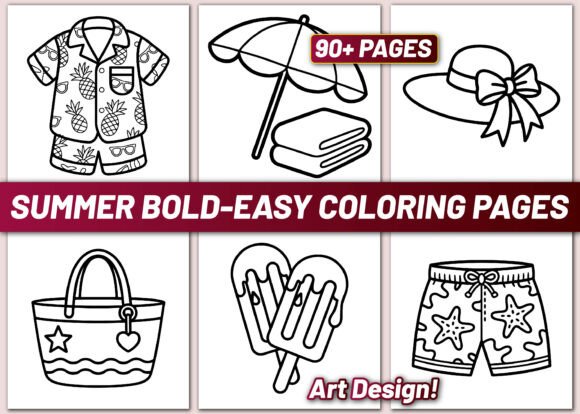
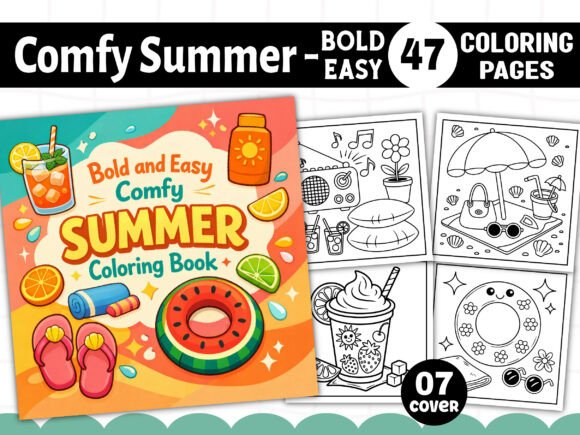
For anyone involved in KDP publishing, the process typically moves from idea generation to asset creation, interior layout, cover design, and finally to upload and launch. The Bold and Easy Comfy Summer Coloring Book package acts as a core asset library during the interior creation stage. Instead of sourcing individual illustrations from multiple vendors or creating them from scratch, you receive a unified set of 47 designs that share a consistent style and theme. This consistency is critical for building a book that feels intentional rather than cobbled together.
The set arrives as a .zip file containing PDF, PNG, JPG, SVG, and EPS formats. This variety means you can work in whatever software you already use—whether that is Adobe InDesign, Affinity Publisher, Canva, or even Microsoft Word. The EPS and SVG files are particularly useful if you need to adjust sizing or combine elements across pages, while the high-resolution PNG and JPG files are ready for direct placement into a layout. Having multiple formats reduces friction and lets you focus on page arrangement rather than file conversion.
Because the designs are black and white with 300 DPI resolution, they are print-ready straight out of the package. You do not need to clean up lines, adjust contrast, or worry about color shifting. This is especially helpful when working with print-on-demand services, where file quality directly affects how the book looks on paper. The 8.5” x 8.5” square format is a popular size for coloring books because it offers a balanced canvas for both detailed and bold illustrations without being unwieldy for users.
Using the Set Before, During, and After Your Project
One of the strengths of this resource is how it can be used at different stages of a project, depending on your goals. Before you begin laying out pages, you can browse the 47 designs to plan the flow of your book. Some illustrations are more detailed, while others feature bold, simple lines that suit beginners or younger colorists. Grouping similar styles together creates natural sections within your book, which improves the user experience and makes the book feel curated.
During the layout phase, you have the freedom to arrange pages in any order you choose. Because the designs are provided as individual files, you can import them into your layout software and experiment with different sequences. You can also combine them with other elements such as title pages, dedication pages, or sample finished-color pages if you want to add extra value. The free 07 PNG book cover assets included in the package further streamline the process—you have a starting point for your cover design that matches the interior style, saving you from having to create a cover from scratch.
After your book is published, the same files can serve as marketing assets. The PNG and JPG versions are suitable for social media posts, email newsletters, or blog content that previews sample pages. Showing potential buyers a clean, high-resolution preview of the interior helps build trust and reduces the likelihood of returns. You can also use the EPS or SVG files to create promotional graphics that highlight the bold, easy-to-color style of the book.
How This Resource Interacts with Other Tools and Methods
The Easy Comfy Summer Coloring Pages set works well alongside common publishing and design tools. If you use Adobe InDesign or Affinity Publisher, the EPS and PDF formats integrate seamlessly for precise placement and scaling. For users of Canva, the PNG and JPG files can be uploaded directly and arranged on a square canvas. Canva also allows you to add page numbers, borders, or background elements if you want to customize the book further.
For those who prefer a more automated workflow, the 01 PDF file that is print-ready can be used as a foundation. You can open it in a PDF editor to rearrange pages, add your own front and back matter, and then export a final version for KDP upload. This approach minimizes the amount of software-specific knowledge needed, making it accessible even if you are not a professional designer.
If you work with a team—such as a freelance formatter, a cover designer, or a reviewer—the variety of file formats makes collaboration easier. You can send the EPS files to a designer for cover adjustments, use the PNG files for mockups, and share the JPG files with a proofreader for a quick review of page order. Each person can work with the format that suits their tool, without needing to convert or re-export files repeatedly.
Practical Implementation Tips for a Smooth Workflow
To get the most out of this set, start by unzipping the folder and organizing the files into subfolders based on format. This prevents clutter and makes it easy to find what you need during layout. For example, you might create separate folders for PNG, JPG, SVG, and EPS, and keep the print-ready PDF and EPS files at the top level for quick access.
Before importing into your layout software, open a few of the PNG files to confirm the resolution and line quality. At 300 DPI and 8.5” x 8.5”, each file should appear crisp when viewed at actual size. If you plan to resize any images, use the vector formats (SVG or EPS) to avoid quality loss. Raster formats like JPG are fine for placement as-is, but scaling them up can introduce blurriness.
Consider creating a master file in your layout software that contains all 47 pages in your preferred order. Save this master file as a template so you can reuse the structure for future books. You can swap out the image files while keeping the page margins, trim marks, and bleed settings intact. Over time, this template will save hours of repetitive setup work.
For the cover, use the included 07 PNG book cover files as a base. You can adjust colors, add text, or overlay your title and author name. Because the cover assets match the interior style, your book will have a consistent look from front to back. If you are creating a series, these same assets can be adapted with different color schemes or titles to build brand recognition across multiple books.
Quality Control and Long-Term Use
Before uploading to KDP, it is wise to do a quick quality check on the final PDF. Print a few pages at home or use a local print shop to verify that the lines are dark enough and that the page margins allow for proper binding. The set’s black-and-white format is designed for clarity, but checking a physical proof catches issues like faint lines or uneven scaling that might not be visible on screen.
For long-term use, keep the original .zip file stored in a reliable location—cloud storage or an external drive. The files are yours to use for multiple projects, so you can create a single book, a series, or even combine them with other collections over time. Because the designs are bold and easy, they appeal to a broad audience including adults who want stress-free coloring, seniors who prefer simpler patterns, and children who enjoy large areas to fill. This versatility means the same set can serve different niches depending on how you position the book.
If you decide to expand your series later, having the SVG and EPS files allows you to modify individual designs. You might add background elements, change the thickness of lines, or combine multiple illustrations into a single page for a more complex layout. The vector formats give you that flexibility without needing to redraw anything.
Observations on Usability and Consistency
One of the practical benefits of the Bold and Easy Comfy Summer Coloring Book package is the unified style across all 47 pages. In a world where many coloring books mix multiple illustration styles, having a consistent look helps readers know what to expect on every page. This builds trust and encourages repeat purchases if you publish additional titles using the same design language.
The square 8.5” x 8.5” format also works well for both binding types. For paperback, the square shape is visually appealing on a shelf and fits comfortably in hand. For spiral-bound versions, the square shape ensures that images do not get lost in the gutter. If you plan to offer both formats, the interior PDF can be used for either with minimal adjustment.
Finally, the resolution and file formats make this set suitable for both digital and print use. You could repurpose selected pages as digital downloads, printable sheets, or even wall art if you want to diversify your product offerings. The high-resolution PNG files are especially good for digital distribution because they display well on screens without compression artifacts.
Integrating the Set into Your Routine
If you publish coloring books regularly, the Easy Comfy Summer Coloring Pages set can become a repeatable resource in your production cycle. After you complete a book using these files, take notes on what worked well—such as the order you chose, any additional elements you added, or how you adjusted the cover. These observations will inform your next project and help you refine your process over time.
For someone new to KDP, this package removes much of the guesswork from interior creation. You do not need to hunt for images, worry about licensing, or deal with mismatched styles. The included formats cover the most common publishing workflows, so you can focus on the parts of the process that add the most value: page sequencing, cover design, and book description writing.
In a market where speed and quality both matter, having a reliable asset set like this one lets you move from concept to publication with fewer delays. The result is a polished book that meets customer expectations and gives you a solid foundation for future projects.